

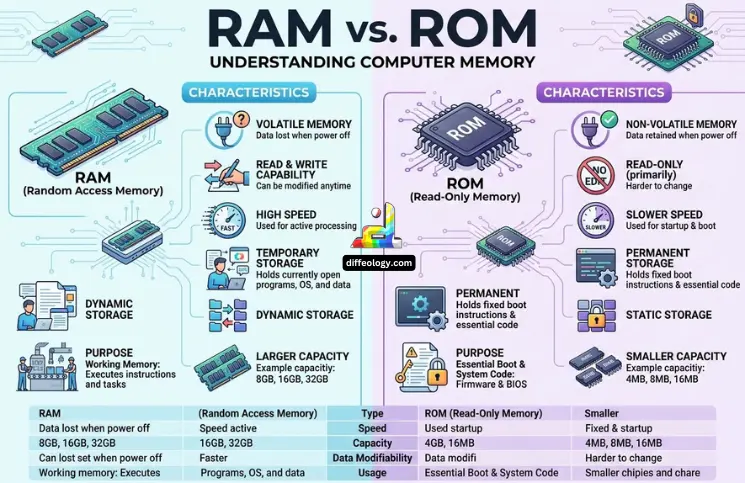
Difference Between Ram and Rom is easy to understand when each one has a simple role. RAM helps a device work fast while apps are open. ROM helps the device start and remember basic instructions.
Both RAM and ROM are important, but they are not the same thing.
Main Difference Between Ram and Rom
RAM is temporary memory, and ROM is permanent memory. Information stored in RAM is kept as long as the computer is powered on. In contrast, ROM keeps the information intact even if the computer is turned off.
Ram Vs. Rom
What is RAM?

RAM is an abbreviation for Random Access Memory. RAM refers to short-term memory in a computer, laptop, phone, or tablet. Once an application opens, all data needed is sent to RAM to enable fast access by a processor. Hence, the higher RAM amount leads to better performance and lower stress for a computer. For everyday internet surfing, e-learning, and work-related activities, RAM of 8 GB is enough. Gaming, video editing, graphic design, programming, and multiple opened browser tabs require 16 GB or 32 GB of RAM. Windows 11 requires a minimum of 4 GB of RAM, but it is the bare minimum, and not ideal at all.
Read Also: Difference Between Memory and Storage
- RAM is temporary memory.
- RAM loses data when power goes off.
- RAM helps apps run faster.
- RAM supports multitasking.
- DDR5 RAM starts at 4800 MT/s.
- DDR4 RAM commonly reaches up to 3200 MT/s.
- DDR5 has about 50% higher starting bandwidth than DDR4.
What is ROM?
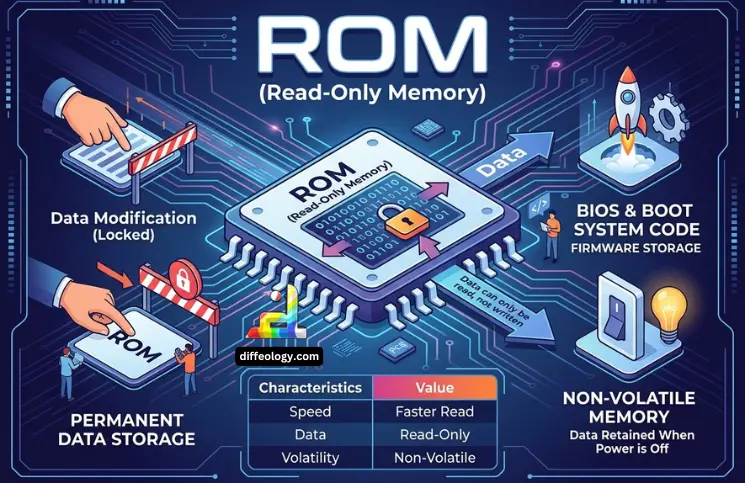
It is made up of crucial instructions that must be present for the system to function properly. It retains information after power is turned off since it is non-volatile. This memory type is used in computers, cell phones, routers, printers, game stations, and other intelligent gadgets. In modern machines, firmware can be saved using flash memory; but the purpose remains the same – it saves the important code which does not change much. Though ROM does not provide speed like RAM, it is crucial for startup.
Read Also: Difference Between DDR3 and DDR3L
- ROM is a permanent memory.
- ROM keeps data without power.
- ROM stores firmware and startup code.
- ROM is not used for daily multitasking.
- ROM data changes rarely.
- ROM helps hardware and software begin working together.
Comparison Table “RAM Vs. ROM”
| Full form | Random Access Memory | Read-Only Memory |
| Memory type | Temporary | Permanent |
| Power effect | Data is lost after power off | Data stays after power off |
| Main use | Runs apps and files | Stores firmware and startup code |
| Speed | Faster for active work | Slower for active work |
| Data change | Changes often | Changes rarely |
| Common size | 4 GB to 64 GB | Usually smaller |
| Upgrade | Often upgradeable | Usually fixed |
| Example | DDR4, DDR5 | BIOS, UEFI, EEPROM |
Difference Between Ram and Rom in Detail
Get to know the Ram Vs. Rom in Detail.
1. Purpose
RAM is made for current work. It holds the data needed by open apps, files, games, and browser tabs.
ROM is made for startup and control. It stores instructions that help the device begin before the main system loads.
2. Data Storage
RAM stores data for a short time. If a file is not saved and power goes off, that work may be lost.
ROM stores data for a long time. It keeps key instructions even when the device is fully turned off.
3. Speed
RAM is fast because it handles live tasks. More RAM can make app switching and multitasking feel easier.
ROM is slower for active work, but speed is not its main goal. Its main job is safe storage of basic instructions.
4. Power Use
RAM needs power to hold data. Once power stops, RAM forgets what it was holding.
ROM does not need power to keep its data. That is why it can store firmware for years.
5. Read and Write
RAM can read and write data again and again. Apps use it every second while the device is on.
ROM is mostly read by the device. Some modern ROM-like memory can be updated, but not as often as RAM.
6. Size
RAM is often measured in gigabytes. Common sizes include 4 GB, 8 GB, 16 GB, 32 GB, and 64 GB.
ROM is usually smaller because it stores fixed instructions, not full apps, photos, or daily work files.
7. Performance
RAM has a direct effect on daily speed. Low RAM can cause lag, freezing, and slow tab switching.
ROM affects startup and hardware control. Bad or outdated firmware can cause boot errors or device problems.
Key Difference Between Ram and Rom
Here are the key points showing the Difference Between Ram Vs. Rom.
1. Memory Type
RAM is temporary memory. ROM is a permanent memory.
2. Full Form
RAM means Random Access Memory. ROM means Read-Only Memory.
3. Power Need
RAM needs power to keep data. ROM keeps data without power.
4. Main Job
RAM runs active tasks. ROM stores startup instructions.
5. Speed
RAM is faster for daily use. ROM is slower but stable.
6. Data Loss
RAM loses data after shutdown. ROM keeps data after shutdown.
7. Data Change
RAM changes data many times. ROM changes data rarely.
8. Startup Role
ROM starts the device first. RAM helps after the system begins loading.
9. Common Size
RAM may be 8 GB, 16 GB, or 32 GB. ROM is usually smaller.
10. Upgrade Option
RAM can often be upgraded. ROM is usually fixed inside the device.
11. Cost Impact
More RAM can raise device prices. ROM is usually part of the base hardware.
12. Examples
RAM includes DDR4, DDR5, SRAM, and DRAM. ROM includes PROM, EPROM, EEPROM, BIOS, and UEFI.
13. Best Use
RAM is best for multitasking. ROM is best for startup and firmware.
14. Daily Effect
RAM affects how fast a device feels. ROM affects how the device starts and controls hardware.
FAQs: Ram Vs. Rom
Conclusion
Difference Between Ram and Rom becomes simple when their jobs are separated. RAM acts as the work space memory for running applications, thus impacting speed, software performance, handling of multiple browser tabs, and overall multi-tasking ability. ROM holds the necessary commands to start the device and control its hardware. In terms of priority for a consumer/student, RAM is important for the regular operation of the machine, whereas ROM is crucial for booting up.
References & External Links
- Understanding RAM: What Are Gigabytes of RAM and How Much Do You Need?
- What Is ROM in a Laptop? Storage Basics Explained

