

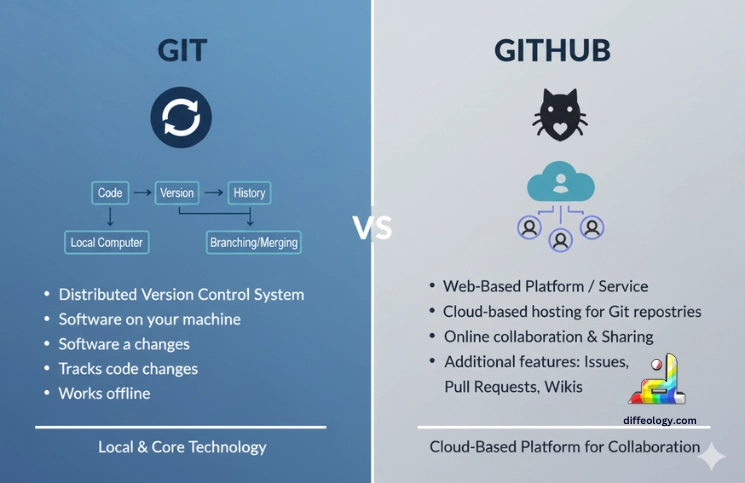
Git and GitHub are two tools people use to work on code. Knowing the difference between Git and GitHub is essential for you. Git is a program you install on your computer to save changes and keep a record of your work. GitHub is a website where you can put projects that use Git so other people can see them, copy them, or help. Many developers use Git; about 90% of people who use version control choose it. GitHub started in 2008 and became very popular. In 2018 it was bought for $7.5 billion.
This intro explains both tools in very simple words and shows how they work together.
Main Difference Between Git and GitHub
The main difference is easy to remember: Git is the tool that tracks changes on your own computer. GitHub is the website that stores those tracked changes and gives tools for teamwork. With Git you can work without internet. With GitHub you go online to share work, ask for feedback, and let others join your project. One tool handles versions, the other helps people share and manage the project.
Git Vs. GitHub
What is Git?
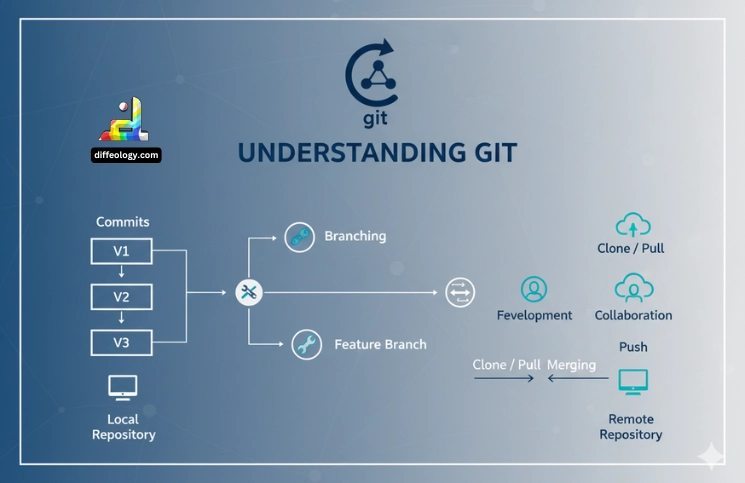
Designed to store snapshots of your files over time, Git is a tool. Every picture is a commit. When you wish to store a group of modifications, you make a commit. You can revert to an earlier commit should something go wrong later. This encourages experiments with fresh ideas. Created in 2005 to support big projects with simultaneous labor by many, Git was intended to be helpful. Many jobs are quick and offline working possible as it keeps a complete history on your computer.
Read Also: Difference Between ChatGPT and Gemini
Using Git, you create branches to experiment with new capabilities, merge branches to combine effort, and correct faults by going back to earlier commits. Among the often used instructions are pull, branch, commit, merge, and push. When desired, these enable you to save work, experiment with modifications, merge work, and communicate updates. You have command and may see your project’s whole history as Git stores everything locally.
What is GitHub?
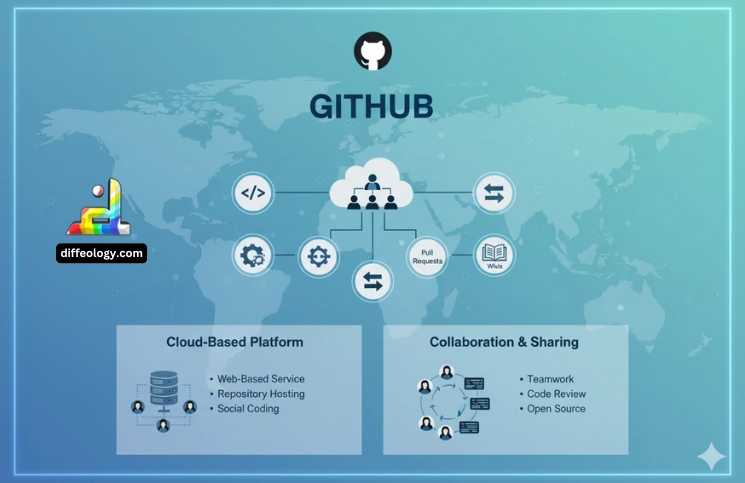
Built to save projects that utilize Git, GitHub is a web service. 2008 marked its start. You can post a project on GitHub so that others can see the files on a website. Your project can be forked, issues can be opened to highlight flaws, and pull requests can propose corrections. GitHub also has features that automatically execute tests and other tasks upon changes. GitHub was purchased for $7.5 billion in 2018; then, more features for companies and teams were added.
Read Also: Difference Between Web 2.0 and Web 3.0
Public projects anyone may read and private ones you share with only chosen people abound on GitHub. Teams use GitHub to handle who may modify code, execute security checks, and connect assignments to planning boards. This simplifies team collaboration and code protection. Many people come GitHub to study, to exchange, and to find projects to join.
Comparison Table “Git Vs. GitHub”
| Type | Version control software | Online hosting and collaboration |
| Runs on | Local machine | Cloud web |
| Main role | Track changes and history | Host repos and help teams work together |
| Work offline | Yes | No for sharing features |
| Team tools | Branching and merging | Pull requests, issues, Actions |
| Access control | Depends on host | Built-in permissions and controls |
| Cost | Free | Free and paid plans |
Difference Between Git and GitHub in Detail
Get to know the Difference Between Git Vs. GitHub in Detail.
Nature and Purpose
Git is a computer program that operates on your computer. Its responsibility is to track your files’ modifications and maintain a history. It emphasizes speed and safety so you can experiment and go back as necessary. A web service called GitHub keeps projects using Git and provides code review and issue tracking among other capabilities to support team cooperation.
One is an online platform for sharing and managing projects; the other is a local tool for version control.
Where They Run
Mostly, you use your computer to perform most of the Git tasks. Offline, you may view history, branch, and commit. This speeds many of behaviors and keeps them private. One run GitHub is on the internet. To examine pull requests or share code, you have to be online.
This division causes you frequently to work locally with Git before sharing your changes to GitHub.
Essential Traits
Commits are tracked by Git, branches are produced, and changes are merged. It is effective data storage and simple navigation through history using commands. These characteristics help one to keep a straight record of who changed what when. GitHub includes Actions to automate tasks such tests and builds, pull requests for discussion, and issues for task tracking.
Thus, Git provides the groundwork; on top of it, GitHub creates cooperation tools.
Uses Scenarios
When you need to save versions, experiment with concepts in branches, and work offline with a full history on your computer, Git is the tool. Share your work, obtain reviews from others, or execute automated cloud-based tests by means of GitHub.
Many people may locate and join open-source projects, hence they often live on GitHub.
Learning and Interfacing
People begin with a few Git instructions and pick up more as they go. Though beginners might be aided by graphical tools, the command line is rather frequent. GitHub has a web interface displaying files, pull requests, and issues. New users find it simpler to see and click objects on the site.
Beginners usually master enough Git to work locally and then discover GitHub tools for teamwork.
Access and Safety
Git supports signed commits to provide evidence of who made changes and stores a complete copy of the repository locally. Git does not control who may access a shared online repository by itself. GitHub offers team and role permissions, private repos, audit logs, and security scanning to help organizations control access and find problems.
These extra controls on GitHub help businesses keep their code safe and track who did what.
Ecosystem and Integrations
Many editors and tools work with Git because it is the standard. GitHub connects to many apps and services through a marketplace. It also supports actions that run tests and deploy code. This broad support makes it simple to plug GitHub into a team’s workflow and automate repetitive tasks.
In short, Git is the engine; GitHub is the garage full of tools that make the engine useful for teams.
Key Difference Between Git and GitHub
Here are the key points showing the Difference Between Git Vs. GitHub.
- Type Git is a program on your computer. GitHub is a website that hosts projects.
- Install You install Git on your device. You do not install GitHub because it is online.
- Purpose Git saves versions and history. GitHub helps people share and review those versions.
- User view Git is used with commands or apps. GitHub is used in a web browser.
- Teamwork Git gives the tools to branch and merge. GitHub gives pull requests and reviews.
- Storage Git stores full history locally. GitHub keeps copies in the cloud.
- Task tracking Git tracks file changes. GitHub tracks tasks, bugs, and project plans.
- Automation Git itself does not run tests automatically. GitHub can run Actions to test and deploy.
- Community Git is the tool most developers use. GitHub is a large community site where people find and share projects.
- Business features Git is free to use. GitHub offers free and paid plans for teams and businesses.
- Learning Git takes practice to learn commands and concepts. GitHub is simpler to start with due to its web interface.
- Data place Git keeps history on your machine. GitHub keeps projects on servers so others can access them.
- Cost Git is free and open-source. GitHub has free plans and paid tiers for extra features.
- History Git was created in 2005. GitHub launched in 2008 and was bought for $7.5 billion in 2018.
FAQs: Git Vs. GitHub
Conclusion
Learning the difference between Git and GitHub makes it easier to know what to use when: Git is the local tool that saves your work and keeps history, while GitHub is the online place that hosts Git projects and adds tools for teamwork, reviews, and automation; using both together helps teams build and share code more safely and faster.

